As most of you aware, IP 2014 is now available on eDelivery!
I was very eager to see the responsive web design part of it! So went ahead and downloaded and setup my sample. The first look – impressive layout. Though, in my case, it is opening only on firefox and IE11 (haven’t tried other IE versions). In Chrome it keeps spinning. You need to set
EnableFQDN = FALSE in your cfg for it to work!
Important Update:(From Alex on siebel-essentials) Please be aware that Patchset 1 for Innovation Pack 2014 will be mandatory for production use. Patchset 1 will be made available on My Oracle Support in due time (official GA). In the meantime, you can benefit from using the installers for evaluation and upgrade preparations and of course peruse the new documentation to learn about new features.
See the general navigation below.
MVGs back to how they were in HI!
Editing attachments inline – users are eagerly waiting for it! See it here.
Note: inline editing worked only on Firefox and not on chrome for me.
I am disappointed by the responsiveness. See here,
Above, you can see the list and form applets are pretty static. Only Logo, Menu, toolbar etc are dynamically changing. I was hoping much more as part of IP2014 on this. I was imagining List Applets to reduce in height and users will be able to scroll on list applet with their fingers on smaller devices. I was hoping Form Applets will adjust the layout based on the device size. It’s time for more explorations and custom PRs to make that happen!
More to come, hold on till then!
Cheers,
Shiv
Showing posts with label Siebel Upgrade. Show all posts
Showing posts with label Siebel Upgrade. Show all posts
Wednesday, 19 November 2014

Friday, 14 November 2014
Open UI - styling your form applets - add sections or tabs!
Most of the complaints you hear from typical Siebel users is that their screens are bulky, seeing a lot of unnecessary fields dumped into one big form applet. How about redesigning them so that you logically group only the relevant fields into one group and show only that group at a time.
I found Jquery UI has accordion and tab options to display content in group. See below to see them in action.

You can get Accordion demo on jquery ui site here: http://jqueryui.com/accordion/
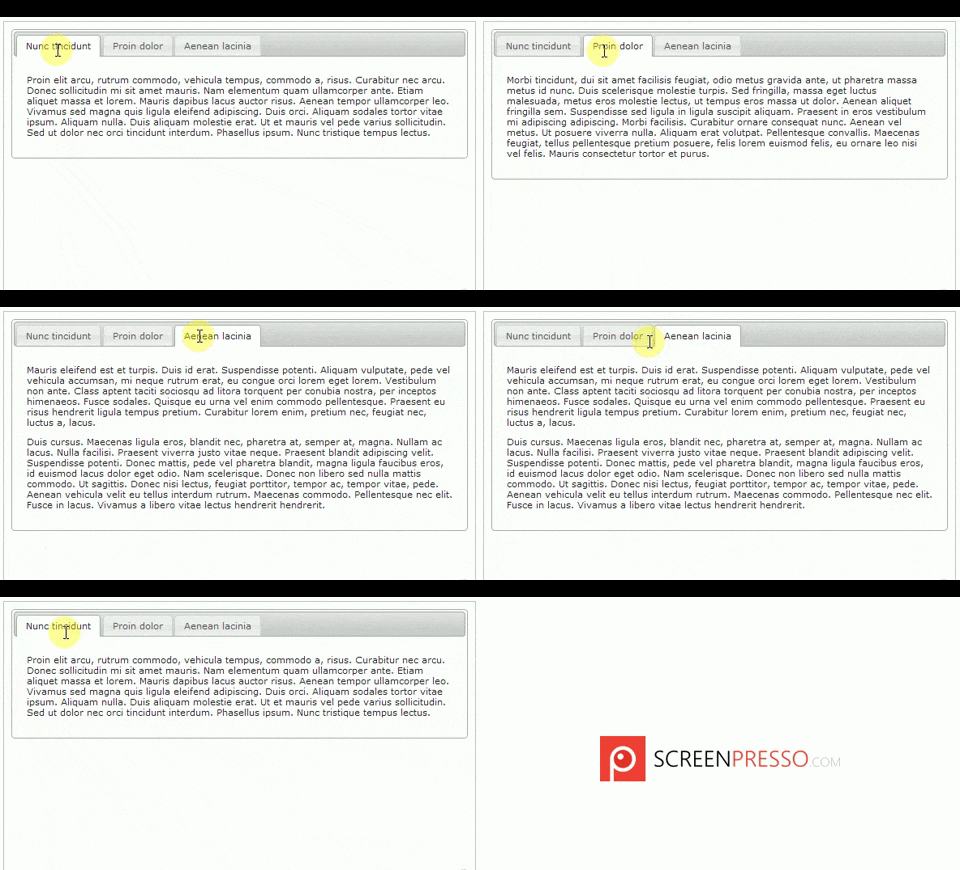
You can get Tabbed display demo on jquery ui site here: http://jqueryui.com/tabs/#mouseover
Go through their example to understand how they do it.
Now, I leveraged above in to my Siebel form applets and here is the outcome.
How to go about?
I found Jquery UI has accordion and tab options to display content in group. See below to see them in action.

You can get Accordion demo on jquery ui site here: http://jqueryui.com/accordion/

You can get Tabbed display demo on jquery ui site here: http://jqueryui.com/tabs/#mouseover
Go through their example to understand how they do it.
Now, I leveraged above in to my Siebel form applets and here is the outcome.
How to go about?
Tuesday, 11 November 2014
Siebel monitoring – build your own and of course free!

Taking a bit of a side track from Open UI topic here. There are very few of the shelf tools available in the market when it comes to monitoring your Siebel servers which can
- monitor servers and components at a micro level
- Alert admin users before your business starts complaining.
- Easily configurable
- a job which monitors the servers status and alert set of users by email if any of the server is not Online.
- a job which monitors set of listed components and alert users if any of them in trouble via email
use case 1: To monitor servers (by status)
The need:
At every 10 mins, (or at desired interval)
Wednesday, 29 October 2014
Open UI - Free Address Auto complete powered by Google API
If you are looking for a free address auto complete for your Open UI users, here is the solution. I am sure, this will compete with other paid services like Experian (QAS), Informatics etc for Address verification and validation services.
Present scenario:
Users manually enter address info, leading to inconsistent/incorrect data on the system.
With Autocomplete API integrated:
Users just need to search for the address and select it. System will do the rest - it will copy the standard address info from Google and auto-populates the address fields on Siebel.
Demo first.
High level technical flow:
Present scenario:
Users manually enter address info, leading to inconsistent/incorrect data on the system.
With Autocomplete API integrated:
Users just need to search for the address and select it. System will do the rest - it will copy the standard address info from Google and auto-populates the address fields on Siebel.
High level technical flow:
Friday, 24 October 2014
Google map integration with Open UI – route planning based on sales reps calendar!
Hi All,
I would love to update more often on my blog but unfortunately, my work load is pulling me back. While I was hiding from my blogging, was busy improvising our sales reps day to day operations by means of integrating their visits with Google optimized route planning.
Before you can understand the subsequent content of my blog, you need to understand the google map API itself. I am not going to go into that but provide you the link to explore your self. So, click on the image below and explore the Google map API.

Ok demo first. Please watch below video for an insight as to what I will be talking next.
The business scenario goes like this. As soon as your sales rep logs onto Open UI, he will be shown with his current appointments in the calendar applet and the corresponding locations are plotted on the map along with full direction details at the bottom of the screen.
How to go about it? (High level)
I would love to update more often on my blog but unfortunately, my work load is pulling me back. While I was hiding from my blogging, was busy improvising our sales reps day to day operations by means of integrating their visits with Google optimized route planning.
Before you can understand the subsequent content of my blog, you need to understand the google map API itself. I am not going to go into that but provide you the link to explore your self. So, click on the image below and explore the Google map API.

Ok demo first. Please watch below video for an insight as to what I will be talking next.
The business scenario goes like this. As soon as your sales rep logs onto Open UI, he will be shown with his current appointments in the calendar applet and the corresponding locations are plotted on the map along with full direction details at the bottom of the screen.
How to go about it? (High level)
Friday, 12 September 2014
Open UI – Common look and feel issues and work-around
It’s been a while I updated my blog. Got bit busy with Open UI rollout in my company. Through the journey, encountered some common problems for which you might as well be looking for solutions. Here are few to share with you.
1) iHelp error due to SI Applet
Before:
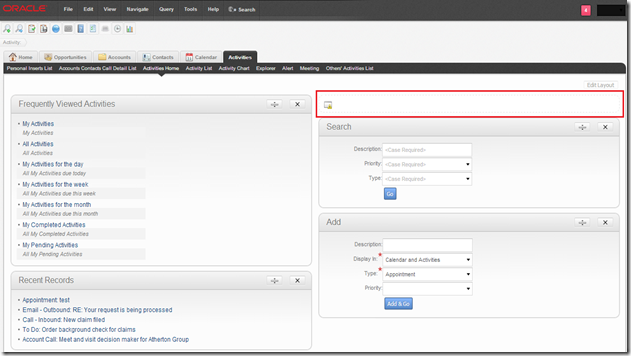
After:
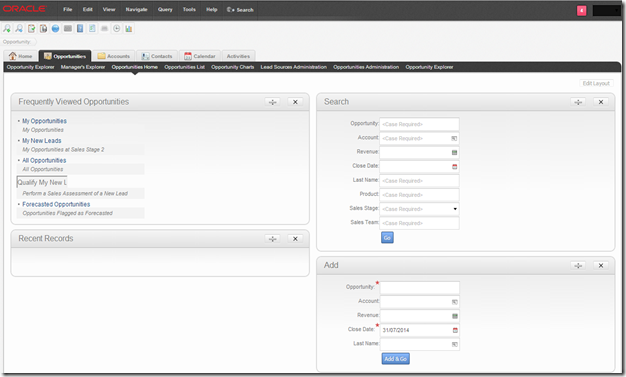
Please check my previous blog to remove iHelp error here.
2) Salutation error due to SI Applet
Before:


3) Applets not contained within the boundaries of the screen
Before:
Navigation: Sales Sample –> Account –> Account Summary – Prepaid. You can see below the Installed Assets and Current Balance taking almost 80% of the screen. If you add/remove columns displayed, you can see the list applet and the full left side of the stack growing/shrinking.

After: You can see now it is 50-50 proper split. Even if you add/remove columns the split won’t alter.

So the fix – unfortunately, this one goes into swt files. The view is: SIS OM Customer Account Portal View – Prepaid. The web template associated to this view is: CCViewParentMultiChildWithTabs.swt. This is the template we need to alter. Make sure you copy the file from /WEBTEMPL/OUIWEBTEMPL to /WEBTEMPL/OUIWEBTEMPL/custom. Now open the web template and you should find a structure somewhat like below.
4) On Home pages having Search, Add and Go the labels being wrapped to next line
Before: On Contact Home, we got Add and Go. The labels are shown with text wrapping. Looks bit odd.

After: It looks much nicer.
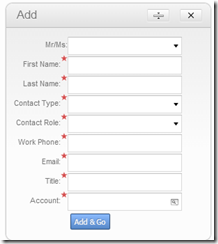
You can see this even on form applets too.
Above is a simple fix by adding a custom css on your theme and add below line and link to your theme.
5) Varying Row Height on list applets containing columns with multi line texts
Before: If you have fields which run multilines like Address, Notes etc, you see the row height varying accordingly to number of lines.

After: Now you can see all rows in your list applet of same height.
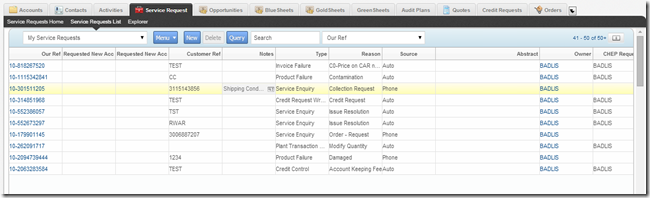
Again simple fix using css as below.
After: Adding horizontal scroll. Users can scroll right to see the remaining fields. Not very user friendly, but still works1

Again a simple css fix,
Developers are working to fix the form applet layout individually where they are getting cropped. Hard work han? No workaround as of now other than horizontal scrollbar.
All in all, overall Open UI out of the box theme is coming along nicely with not many burning issues open. I will update with more findings shortly. Till then take care.
Cheers,
Shiv
- iHelp error due to SI Applet
- Salutation error due to SI Applet
- Applets not contained within the boundaries of the screen – especially views like Account Summary -containing 50-50 split for applets
- On Home pages having Search, Add and Go the labels being wrapped to next line.
- varying Row Height on list applets containing columns with multi line texts
- Anchor tags not coming with underline and default blue colour
- Some large form applets not fitting within the screen and seem like cropped
- Let’s go through the workarounds for above now.
1) iHelp error due to SI Applet
Before:
After:
Please check my previous blog to remove iHelp error here.
2) Salutation error due to SI Applet
Before:
After:
Please check my previous blog to fix salutation error here.
3) Applets not contained within the boundaries of the screen
Before:
Navigation: Sales Sample –> Account –> Account Summary – Prepaid. You can see below the Installed Assets and Current Balance taking almost 80% of the screen. If you add/remove columns displayed, you can see the list applet and the full left side of the stack growing/shrinking.

After: You can see now it is 50-50 proper split. Even if you add/remove columns the split won’t alter.

So the fix – unfortunately, this one goes into swt files. The view is: SIS OM Customer Account Portal View – Prepaid. The web template associated to this view is: CCViewParentMultiChildWithTabs.swt. This is the template we need to alter. Make sure you copy the file from /WEBTEMPL/OUIWEBTEMPL to /WEBTEMPL/OUIWEBTEMPL/custom. Now open the web template and you should find a structure somewhat like below.
<table datatable="0" summary="" bgcolor="#ffffff" width="100%" border="0" cellspacing="1" cellpadding="3"> <tr valign="top"> <td colspan="3"> swe goes here </td> </tr> <tr valign="top"> <td width="50%"> swe for three left side applets go here </td> <td width="50%"> swe for three right side applets go here </td> </tr> </table> The trick here is to set the css styling to have table-layout:fixed for the table that shows applets in 50-50 split. Since in this case within <table> tag, we have two <tr> we need to have split into two tables for it to make it work. Somewhat like below, <table datatable="0" summary="" bgcolor="#ffffff" border="0" cellspacing="1" cellpadding="3" style="width:100%;table-layout:fixed"> <tr valign="top"> <td colspan="3"> swe goes here </td> </tr> </table> <table datatable="0" summary="" bgcolor="#ffffff" border="0" cellspacing="1" cellpadding="3" style="width:100%;table-layout:fixed"> <tr valign="top"> <td width="50%"> swe for three left side applets go here </td> <td width="50%"> swe for three right side applets go here </td> </tr> </table> After the changes the file should look like this - CCViewParentMultiChildWithTabs.swt | |||
4) On Home pages having Search, Add and Go the labels being wrapped to next line
Before: On Contact Home, we got Add and Go. The labels are shown with text wrapping. Looks bit odd.

After: It looks much nicer.

You can see this even on form applets too.
Above is a simple fix by adding a custom css on your theme and add below line and link to your theme.
.siebui-form-label {
        white-space: nowrap;
}
5) Varying Row Height on list applets containing columns with multi line texts
Before: If you have fields which run multilines like Address, Notes etc, you see the row height varying accordingly to number of lines.

After: Now you can see all rows in your list applet of same height.

Again simple fix using css as below.
.ui-jqgrid tr.ui-row-ltr td {
    height: 20px;
    padding: 0;
    text-overflow: ellipsis;
    white-space: nowrap; /* This is what is fixing it*/
}
7) Some large form applets not fitting within the screen and seem like cropped
Before: You can see Logistics Information form applet, a full column of fields missing on the right (you can’t seven see them) While, we are redesigning the layout to fit whole content within 50% of the space. A quick workaround is to enable horizontal scrolling.


After: Adding horizontal scroll. Users can scroll right to see the remaining fields. Not very user friendly, but still works1

Again a simple css fix,
div.siebui-collapsible-applet {
    overflow-x: auto;
}
Developers are working to fix the form applet layout individually where they are getting cropped. Hard work han? No workaround as of now other than horizontal scrollbar.
All in all, overall Open UI out of the box theme is coming along nicely with not many burning issues open. I will update with more findings shortly. Till then take care.
Cheers,
Shiv
Thursday, 14 August 2014
Open UI - existing browser scripts might cause nightmare
In my company, we are aiming to go-live with Open UI in 3 months time. So, we enabled Open UI and ran a round of regression tests. In round one – we got around 300+ defects logged! with testing still going on.
On close observation, many areas the functionality was broken due to existing browser scripts at various Applet and BC level. I thought of writing a quick note to you guys as to how to go about tackling these. Of course there are various other reasons for your broken functionality which I won’t be covering here.
Step 1: Identifying the objects where browser scripts are present.
The tedious way would be to do a repository flat search to identify the objects having browser scripts and reviewing one by one. I found a very easy way to identify – output of GenB script. If you go into your web server or client /PUBLIC/ENU/srf****/bscripts/all. You will find all the browser script details here.

Step 1: Reviewing existing browser scripts
On close observation, many areas the functionality was broken due to existing browser scripts at various Applet and BC level. I thought of writing a quick note to you guys as to how to go about tackling these. Of course there are various other reasons for your broken functionality which I won’t be covering here.
Step 1: Identifying the objects where browser scripts are present.
The tedious way would be to do a repository flat search to identify the objects having browser scripts and reviewing one by one. I found a very easy way to identify – output of GenB script. If you go into your web server or client /PUBLIC/ENU/srf****/bscripts/all. You will find all the browser script details here.

Step 1: Reviewing existing browser scripts
Wednesday, 30 July 2014
Open UI Customization - iHelp error - get rid of it!
In my previous blog, I explained how to get Home page Salutation HI Error sorted out with more meaningful information. If you haven’t see it then, check it out here.
Extending it further, on all Home Pages (viz. Account Home, Opportunity Home, Activity etc)you see this HI Error message in place of iHelp.
As you know Open UI doesn’t support any of the SI (Standard Interactivity) based HI applets. Until Oracle comes up with a fix for iHelp or you are one of those organizations who doesn’t use iHelp then, you can use below approach to get rid of that section at client side.
After the change this is how it would look like,
Again, So I thought of finding my way – without srf – pure js based one. All I am doing is finding the container for iHelp and removing it from DOM.
Extending it further, on all Home Pages (viz. Account Home, Opportunity Home, Activity etc)you see this HI Error message in place of iHelp.

As you know Open UI doesn’t support any of the SI (Standard Interactivity) based HI applets. Until Oracle comes up with a fix for iHelp or you are one of those organizations who doesn’t use iHelp then, you can use below approach to get rid of that section at client side.
After the change this is how it would look like,

Again, So I thought of finding my way – without srf – pure js based one. All I am doing is finding the container for iHelp and removing it from DOM.
Thursday, 10 July 2014
Open UI Customization - Part 3–Themes explained!
The traditional Siebel HI comes with monotonous look and feel which is blue colour themed. With Open UI, sky is the limit for your themes. As detailed in my pervious blog, Open UI Customization - Part 1 – Intro, Open UI comes with below out of the box themes. Each theme refers to set of JavaScript and CSS files which provide different look and feel to your application.
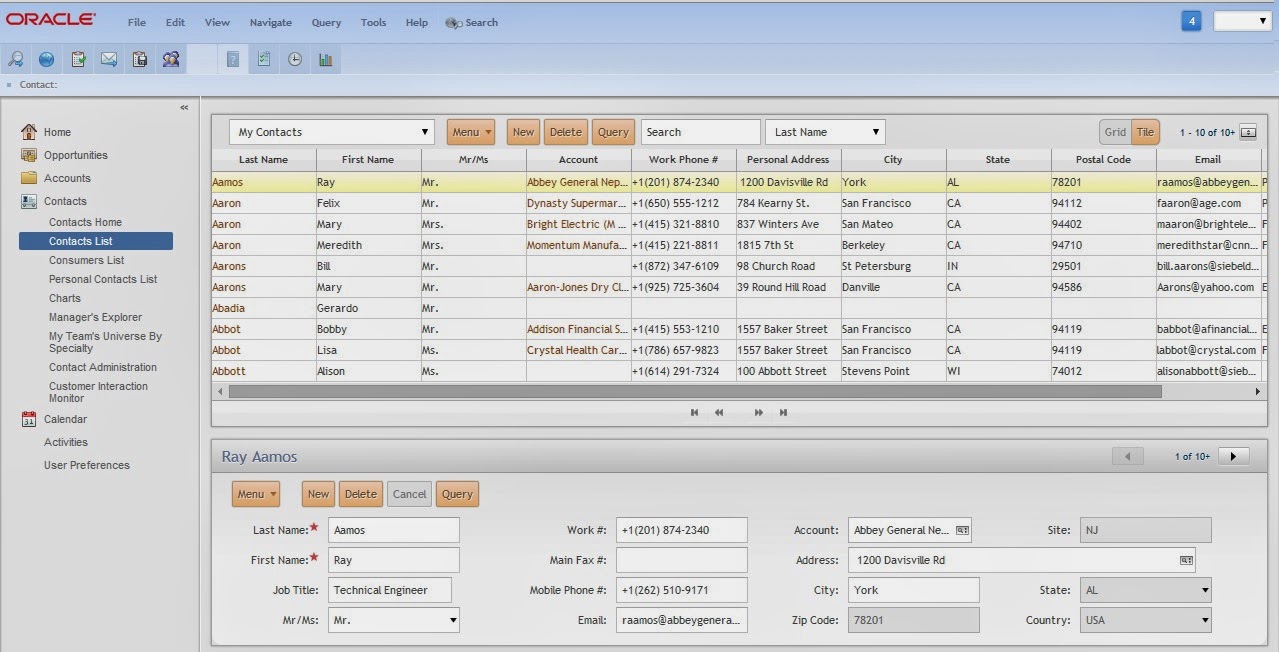
You can change the theme by navigating to Tools -->User Preferences --> Behavior and select values from drop-down for "Navigation Control" and "Theme" fields

Theme 1: Tab - Gray Tab (similar to Siebel HI - Gray colour theme). This is the default theme that Open UI renders.

Theme 2: Tab - Tangerine (similar to Siebel Hi - Tangerine colour theme)

Theme 3: Tree - Gray Accordion (Screen Tabs in Tree structure - Gray colour theme)

Theme 4: Tree - Tangerine Accordion (Screen Tabs in Tree structure - Tangerine colour theme)
So, when you pick a specific theme and log into the application, what Open UI does to render that theme?
Tuesday, 8 July 2014
Open UI Customization - Part 2 - understanding Manifest
If you are new to Open UI and haven’t read my previous previous blog:Open UI Customization - Part 1 – Intro, please do so. In that I have discussed, how Open UI differs from Siebel High Interactivity framework and introduction to PM and PR – which will be discussed at length here.
With Open UI framework, you can control the business logic and UI at the client browser side for below objects:
- Views
- Applets
- Screen Tabs
- Tool bar
- Application Menu

Siebel Open UI uses the presentation model (PM) and the physical renderer (PR) to separate the logical user interface from the rendering. This configuration allows you to modify the user interface without having to modify the logical structure and behaviour of the client.
For example, you can modify a PM to add a list column in a list applet so that it iterates through list columns and renders them without modifying the PM. This column can reside on the client even if the Siebel Server contains no representation of it. Similarly, you can modify the PR to use a third-party, grid-to-carousel control to display a list applet as a carousel without modifying a PM.
Manifest Administration
Before we start building our own PM and PR js files to customize the look and feel of an applet/view etc, let’s first understand how Open UI identifies the required js files to render a specific UI element – applet, view, screen.
A manifest is a set of instructions that Siebel Open UI uses to identify the JavaScript files that it must download from the Siebel Server to the client so that it can render screens, views, and applets.
In order to administrator Manifest, from 8.1.1.11 onwards, Oracle has provided dedicated admin screens. The model is completely different in prior 8.1.1.9-8.1.1.10 releases – which I won’t be covering here.

Thursday, 3 July 2014
Open UI Customization - useful tools needed
Before we crack on understanding how to customize Open UI, I thought of sharing some useful tools that I use. As you might have realized by now that Open UI is all about Javascripts, Jqueries and CSS. You need really good editors/tools to manage your customization.

1) Version Control tool:
Since, you will be updating your Open UI related files quite often, it is essential that you have a good version control tool. There are plenty of good free tools available - but I prefer open source tool: git.
Saturday, 28 June 2014
Enabling Open UI Mobile - detailed instructions!
Please read my previous blog for enabling Open UI here:
Enabling Siebel Open UI - detailed instructions!
Steps to have Open UI Mobile enabled:
1) Create Object manager for Open UI
Follow the steps from previous blog to create new Object Manager SalesmObjMgr_enu. To enable Open UI Mobile for SalesmObjMgr_enu set below params: (Imporant ones: EnableOpenUI, MobileApplication and CFGApplicationName)
Below are the srvrmgr commands to set them:
Param
|
Value
|
EnableOpenUI
|
TRUE
|
AppletSelectStyle
|
"Applet Select"
|
HighInteractivity
|
TRUE
|
MobileApplication
|
TRUE
|
EnableInlineForList
|
Never
|
ShowWriteRecord
|
TRUE
|
EnableSIFocusTracking
|
TRUE
|
SupportedMobileBrowser
|
"Tablet:iPad,Linux,Android-Chrome,webOS,MSIE-Windows
NTTouch,MSIE-Windows NT-ARM|Phone:iPhone,iPod,Linux,Android-Chrome-Mobile,MSIEWindows
Phone"
|
CFGApplicationName
|
"Siebel Sales Enterprise Mobile"
|
Below are the srvrmgr commands to set them:
change param EnableOpenUI = True for compdef SalesmObjMgr_enu
change param AppletSelectStyle = "Applet Select" for compdef SalesmObjMgr_enu
change param HighInteractivity = True for compdef SalesmObjMgr_enu
change param MobileApplication = True for compdef SalesmObjMgr_enu
change param EnableInlineForList = Never for compdef SalesmObjMgr_enu
change param ShowWriteRecord = True for compdef SalesmObjMgr_enu
change param EnableSIFocusTracking = True for compdef SalesmObjMgr_enu
change param SupportedMobileBrowser = "Tablet:iPad,Linux,Android-Chrome,webOS,MSIE-Windows NTTouch,MSIE-Windows NT-ARM|Phone:iPhone,iPod,Linux,Android-Chrome-Mobile,MSIEWindows Phone" for compdef SalesmObjMgr_enu
change param CFGApplicationName = "Siebel Sales Enterprise Mobile" for compdef SalesmObjMgr_enu
change param EnableOpenUI = True for compdef SalesmObjMgr_enu
change param AppletSelectStyle = "Applet Select" for compdef SalesmObjMgr_enu
change param HighInteractivity = True for compdef SalesmObjMgr_enu
change param MobileApplication = True for compdef SalesmObjMgr_enu
change param EnableInlineForList = Never for compdef SalesmObjMgr_enu
change param ShowWriteRecord = True for compdef SalesmObjMgr_enu
change param EnableSIFocusTracking = True for compdef SalesmObjMgr_enu
change param SupportedMobileBrowser = "Tablet:iPad,Linux,Android-Chrome,webOS,MSIE-Windows NTTouch,MSIE-Windows NT-ARM|Phone:iPhone,iPod,Linux,Android-Chrome-Mobile,MSIEWindows Phone" for compdef SalesmObjMgr_enu
After creating the compdef you need to activate it using below command.
activate component definition component_alias_name
In our case, it will be
activate component definition SalesmObjMgr_enu
Now, synchronize the comp by running below command.
Sync comps
2)Set-up web server for Open UI
a) Adding Virtual Directory for salesm_enu
> Logon to your web server and navigate to \BIN directory under SWEApp. In my case, D:\SIA81\SWEApp\BIN
> Run below command from windows command prompt to create a virtual directory on your IIS.
metabaseedit.exe salesm_enu eapps.mtb
b) Pointing your virtual directory entry to the new Object Manager
> Take back up of your D:\SIA81\SWEApp\BIN\eapps.cfg
> copy the existing entry for your Siebel HI Object Manager and modify the ConnectionString it as below.
Enabling Siebel Open UI - detailed instructions!
If you have reached to this blog, it means you have done the upgrade to Siebel 8.1.1.11. If you haven't yet decided then refer to my previous blogs on Siebel upgrade and the need for Open UI here:
Siebel upgrade Vs moving to cloud
Prerequisites for enabling Open UI:
> Siebel 8.1.1.11 with latest patch set installed
> Incremental Repository Merge completed
> Latest fully compiled srf is deployed
Steps to have Open UI enabled:
1) Create Object manager for Open UI
It is always easy to clone an existing working Siebel HI Object manager rather than creating a brand new one. I will give you details for both the options.
NOTE:I am a big fan of using srvrmgr command line as you can build re-usable commands and run them on DEV, test and prod whenever you need. Below is how you connect to srvrmgr command.
Option 1) Clone your current Siebel HI Object Manager
Connect to srvrmgr command prompt and run below command
copy compdef from
For example, I want to clone
my current Siebel HI Object manager SSEObjMgr_enu into
a new Open UI (OUI) Object manager SSEObjMgrOUI_enu
Siebel upgrade Vs moving to cloud
The need for Siebel OpenUI
The need for Open UI Mobile
Prerequisites for enabling Open UI:
> Siebel 8.1.1.11 with latest patch set installed
> Incremental Repository Merge completed
> Latest fully compiled srf is deployed
Steps to have Open UI enabled:
1) Create Object manager for Open UI
It is always easy to clone an existing working Siebel HI Object manager rather than creating a brand new one. I will give you details for both the options.
NOTE:I am a big fan of using srvrmgr command line as you can build re-usable commands and run them on DEV, test and prod whenever you need. Below is how you connect to srvrmgr command.
1. Login into the Application server and navigate to the Drive where Siebel Server is installed (eg: d:\sia81\siebsrvr\bin)
2. SRVRMGR /G “gateway servername” /e “enterprise servername” /u login /p password
Option 1) Clone your current Siebel HI Object Manager
Connect to srvrmgr command prompt and run below command
copy compdef from
source_comp_def_alias to target_comp_def_aliasFor example, I want to clone
my current Siebel HI Object manager SSEObjMgr_enu into
a new Open UI (OUI) Object manager SSEObjMgrOUI_enu
Tuesday, 24 June 2014
How to go about Siebel Upgrade - your path to Open UI!
Ok, if you have reached to this post then, it means you have decided to upgrade your Siebel. If still not sure then, review my previous blog on Siebel upgrade Vs moving to cloud and then come back here.
In this part I will be covering all the preparation work that you need to do to go for Siebel upgrade.
These are the questions you need to first get clarified:
1) What is your current version and is it SEA or SIA?
This will determine, whether you can have one step upgrade or you need to have two step upgrade.
2) What is your current DB version. Is your database Unicode compliant?
Latest Siebel works on Oracle R11g and unicode at best. You may need to plan for DB upgrade along with Unicode conversion.
3) Do you have actuate reports to be migrated to BIP?
If yes, you need to include in your plan to convert all actuate reports into BIP and will increase your upgrade and testing window.
4) Do you have Old Siebel eScript T (typeless) Engine or New ECMA Version 4 ST (Strong Type) Engine?
Siebel 8.*, by default has ST Engine for eScripting. If you have T Engine, you may need to validate most of your eScript code to make it compliant with ST Engine.
5) Do you have CTI telephony integration?
In Siebel 8.*, the CTI architecture is completely changed. If you have CTI, you need to study more to understand the new system.
Identify your Siebel upgrade path:
You can perform one step upgrade directly from following previous releases to Siebel 8.1.1.11 SIA:
In this part I will be covering all the preparation work that you need to do to go for Siebel upgrade.
These are the questions you need to first get clarified:
1) What is your current version and is it SEA or SIA?
This will determine, whether you can have one step upgrade or you need to have two step upgrade.
2) What is your current DB version. Is your database Unicode compliant?
Latest Siebel works on Oracle R11g and unicode at best. You may need to plan for DB upgrade along with Unicode conversion.
3) Do you have actuate reports to be migrated to BIP?
If yes, you need to include in your plan to convert all actuate reports into BIP and will increase your upgrade and testing window.
4) Do you have Old Siebel eScript T (typeless) Engine or New ECMA Version 4 ST (Strong Type) Engine?
Siebel 8.*, by default has ST Engine for eScripting. If you have T Engine, you may need to validate most of your eScript code to make it compliant with ST Engine.
5) Do you have CTI telephony integration?
In Siebel 8.*, the CTI architecture is completely changed. If you have CTI, you need to study more to understand the new system.
Identify your Siebel upgrade path:
You can perform one step upgrade directly from following previous releases to Siebel 8.1.1.11 SIA:
- Siebel 7.5.3 SIA
- Siebel 7.7.2 SIA
- Siebel 7.8.2 SEA and 7.8.2 SIA
- Siebel 8.0 SEA and 8.0 SIA
- Siebel 8.1.1 SEA
Current Version
|
Upgrade Approach
|
Upgrade Tasks
|
|---|---|---|
| 7.5.3 SEA through 7.7.2 SEA | * Full database upgrade.
* Two-step repository upgrade. |
You must perform a two-step repository upgrade:
* Upgrade 7.5.3 SEA through 7.7.2 SEA to 8.1.1 SEA * Upgrade 8.1.1 SEA to 8.1.1.11 SIA |
| 7.5.3 SIA | * Full database upgrade.
* Single-step upgrade. |
Perform a full database upgrade. A Development environment upgrade and a Production environment upgrade is required.
* You can directly upgrade to Siebel CRM version 8.1.1.11. It is a single-step upgrade and post-upgrade process. * The New Customer repository, generated through a three-way repository merge, contains all the content from the Siebel CRM version 8.1.1.11 Innovation Pack. |
| 7.7.2 SIA | ||
| 7.8.2 SIA and SEA | ||
| 8.0 SIA and SEA | ||
| 8.1.1.0 to 8.1.1.7 SEA | ||
| 8.1.1.0 to 8.1.1.9 SIA | * Maintenance release installation.
* Incremental repository merge. |
Run Oracle Universal Installer (OUI) maintenance release installer to apply the Siebel CRM version 8.1.1.11 SIA maintenance release.
NOTE: Siebel Innovation Pack content is not included in the maintenance release.
If you intend to use Open UI and new features included from the Siebel CRM version 8.1.1.11 Innovation Pack then you must import it using incremental repository merge. |
Thursday, 12 June 2014
Siebel Upgrade Vs moving into cloud - my analysis!
I have been working in Siebel
world for almost 12 year now. I am a big fan of Siebel architecture and the
flexibility this product offers to cater for all sorts of weird business
needs. I have played various roles including developer, designer, architect
and functional expert. Presently working as CRM Manager at CHEP (www.chep.com)
looking after the Siebel delivery.
Last year, in my company we
were on Siebel 7.8 version and I was thrown into a situation – do we really
need to upgrade Siebel or throw it and bring other cloud based solutions. So, I
decided to go to the bottom of this analysis and conclude what is best for the organization.
I picked up all the leading CRM suites available in the market and did a round
1 bird’s eye view comparison and we decided to stick to two leading could
providers salesforce and CRMoD by oracle and of course existing Siebel.

Subscribe to:
Posts (Atom)